Monday, February 11, 2008

Thing 8 - Communication Sites

These tools are addicting. I don't know that there's time enough in the day for anyone to get through all of the sites! Most of them are fairly user-friendly and link to many blog sites, which is handy. I could see kids using these sites to add flair to reports, or as a way of creating "yearbooks" or news sites. It does remind me of all the bells and whistles in the good ol' Hyperstudio program. You could hardly get the kids to enter text because they had to play with all the toys.

Most of the sites were pretty easy to navigate and understand, although the database gave me crashing headaches. I linked it, but Blogger wouldn't show the html code I added. It does show the database, but you have to guess where the code is.

I'd definitely recommend the Big Huge Labs site, Flickr, and Picture Trail. I'm a little iffy on the Zoho site, simply because it's dependent on Internet access. It's great for just adding a Powerpoint-like presentation to a blog or website, though.

The only other photo site I use consistently is Photobucket. It has some nice features - probably not as many as Flickr, though.

I tried out a number of sites for Thing 8. The database really irritated me because both of my browsers (Firefox and IE) kept crashing. These are the Things for Thing 8:
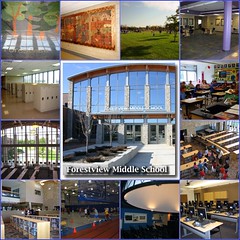


School
Originally uploaded by ckelly181


This mosaic is made from pictures of my school. I used the Mosaic Maker on Big Huge Labs. I posted it as a separate blog entry from Flickr and sent it to this blog.


Oh, how I love Flickr. The upload is fabulous. It lets you select a pile of photos, without having to grab each one, one at a time. Good stuff.

Zoho Slideshow: I created a short presentation for a session I do with new teachers. The text looks fine on the site, but it gets a bit askew when viewing from a blog, I've noticed. It's a nifty resource for people who don't have access to Powerpoint or Keynote. I'm not sure I would use it because it depends on having Internet access. That's not always feasible, depending on where one does presentations.


I would love to be able to add this Picture Trail flick to the school website, but we can't use scripting on our portal. Boo. It would be fun to change this every now and then. Perhaps it's too splashy for a front page, but kids would love to see this somewhere:


This is a database link I created for books for boys. I'm not really impressed with this service. It makes my browsers crash, the script doesn't show up on Blogger, and it's not as user-friendly as some other sites. I could see the benefit of an online database, though. I'm trying to amass a list of books that middle school boys enjoy. I'd like to be able to have an online site where boys could add information - as long as I can moderate it, of course. I couldn't do that on our local portal, unfortunately...again with the scripting issue...bleah.

UPDATE: I deleted the link to the database. It slows down my blog to an annoying level. If I can get the darn site to load, I'll just take a snapshot of the database. I don't like this site at all.

UPDATE2: Above is a snapshot of the datase that was on this blog.

I also created this resume on E-Folio. If I were looking for a job, I'd LOVE to be able to use this site. I'm keeping it up there just to have a resume available in case the powers-that-be decide to kill all public schools in the near future. Kidding. I'm a little disenchanted with our government at the moment.

Tuesday, February 5, 2008

Thing 7 - Email/IM/Text Messaging

I'm pretty comfortable with most of the items listed in Thing 7. My first experience with IM was in 1994 when I joined AOL. I "met" a lot of people (and the rooms weren't full of trolls and spam at that time), but I had a really rude awakening.

At the time, I was just beginning to use an online service at my home, and AOL automatically set up my account. I was amazed by what the service had available. What I didn't realize was that there were no local access points; I was actually connecting to an access point 150 miles away. In other words, I was making a long-distance call every time I logged on.

My first phone bill was over $500! For a young teacher (with not a lot of fun-money), that was terribly shocking. I called my phone company, and the customer service rep didn't even know that a computer could make a long distance call. Times have changed!

I have used a number of IM services - ICQ, Trillian, and currently, MSN and Google Talk, when I have GMail open. Most of my family and friend communicate using IM. I generally leave MSN on and chat with people throughout the evenings.

I have used IM at school to conference with a number of colleagues on peer coaching issues. Our district bans chat for students, although we have done a few projects where students communicate with other students throughout the world. I like the idea of using an Instant Librarian (mentioned in the video), and that may come as more students take online courses during the day. If anyone doing the 23 Things Project wants to practicing IMing...I'd be glad to chat!

I was not impressed with the email tips offered on 43 Folders blog, but I also don't have problems with email taking up my time. I would have to say that I'm much more productive because of email. It helps me keep records of issues, communicate quickly and respond to requests as soon as I get one. If I set my email to check every hour, I'd actually fall behind! Of course that's the nature of my job. It is obviously different for others. Most of my friends and co-workers know that it's quicker to contact me by email than by phone!

I have 6 email accounts which are set up for different purposes: receiving political mail, responding from an anonymous account, family and friends, purchasing items, and work. It's really a good filing system. My accounts are on gmail, yahoomail, hotmail, inbox, my home ISP, and my work Exchange server.

In the middle school, students are banned from using personal email (they sneak it around, of course) but I have requested some students to use their accounts for school work, when appropriate. Our district has the capability for students to use the Exchange server, but it has not been enabled yet.

For teachers, I believe email has made a huge impact on productivity. I know that we rely on being able to communicate immediately by distribution lists. One of the issues I had always struggled with was how to make time to meet with teachers to plan lessons and projects. Email is now the preferred method for a majority of teachers. We can trade ideas and edit documents together without chasing each other down. Staff meetings can focus on curricular issues and not the nut-and-bolts information dumping that can be handled by email, rather than a face-to-face. District meetings can be scheduled and confirmed by email, rather than rely on interschool mailings. How did we survive without email? :)

Ah text messaging, the bane of the middle school teacher. Heheh. I could actually see this as a tool for teachers to remind students of assignments, or to help if students are struggling with homework - provided the teacher is agreeable to that. I personally don't like it for the simple reason that it TAKES FOREVER TO TYPE on that small keyboard! I'm impressed that kids are so fast. It just drives me nuts.

Webinar: I went through the "How to Create a Podcast" webinar. Great, great tool. We do use Atomic Learning in our district - especially the multimedia classes - but I love the additional pdf handouts. What a great resource. I'd like to advertise this for teachers.

I checked out Meebo and Twitter. I usually only use one IM service (MSN), but if I had more, MEEBO would be a great resource. When I did use a few services, I used Trillian, which is a stand-alone IM app. I preferred that to having to deal with many programs and their variety of "bip" sounds. It would be nifty if we were able to connect with other teachers and students and presenters using IM. I have noticed that more sales reps are using online tools like IM to present to districts. It has saved us money, and we are still able to get the information we need.

Twitter is a little anal for my tastes. I'm sure some folks like to be able to stay connected, and I can see this being a good resource for teens and their friends and parents. Perhaps it would work well for an admin or other employee who is on the run a lot.

I also joined the 23 Things Google group. It'll be nice to see other folks on there. I am a member of another Google group about...you guessed it...dogs, so my icon is canine-related. Hope to see folks in the group!

Monday, February 4, 2008

Thing 6 - Image generators

This is so much fun. I'm brainstorming an inservice class for staff. I see the biggest issue dealing with the coding. Creating the graphics is so easy and fun.
This note I'll use to prompt kids to write the due date in their library books.


Many of our classes do a unit on Martin Luther King, Jr. I could see the kids using the trading cards to create short bios on other famous people.


Okay, this one is probably a little silly, but most of the people at work seem to know how to motivate me:


I tried using fototrix.com and ran into some difficulties. I use Firefox, which has some great add-ons. Fototrix, however, doesn't want to play nice with Firefox, even though it recommends the browser. I could not get Firefox to accept the pop-ups that fototrix requires. I used IE7 instead, and that worked fine.

Good thing to know, though. It probably won't be an issue at work, but I will need to go through each site to make sure it's not blocked. I've noticed that several linked photos I have on my blog are blocked at work.

Just for good measure, this is from the selections on fototrix:

Sunday, February 3, 2008

Thing 5 - The addendum to Thing 4

Warhol Corgi

Okay, so I jumped ahead and did a little of Thing 5 in Thing 4's post. I worked on that post for FAR too long. Seriously - FA-AR too long. So, I'm not going to edit that post; I'm simply going to add Thing 5 as an addendum.

This is from the Spell with Flickr site:

Bead Letter C H R I S
I'm starting to get a hankering to get teachers using these tools. I can see fifth graders using this site to create Name Poems.

The motivational posters on the fd's Flickr Toys page reminds me of the fabulous Despair, Inc. posters. Might be fun to create some personalized posters for the library.

The BigHugeLabs page is kind of mind-numbing. I'm having to tear myself away from it. Must. Go. Shopping. Instead. Have to support the economy, you know.

Thing 4 - Image sites

Good grief! It's tough to start looking at picture sites and not eat up the entire day! I have accounts on Flickr, Photobucket and PictureTrail, none of which I've logged onto recently. I was AMAZED at the the changes and enhancements on these sites. It almost makes me feel giddy. I had a lot of fun with this thing. I'll figure out how to get these tools in the hands of teachers and students later. (Where are the emoticons on this blog?? I need a sticky-out tongue icon here.)

PictureTrail Cube (You may notice a theme with my pictures...heh heh).

I had an almost silly "aha" this year. One of our fifth grade students has a dad who is stationed in Iraq. His dad was on leave this fall, and I helped him set up a quick slideshow in Powerpoint to show the kids. It was an amazing and emotional show.

Later that year, the dad contacted me, wanting to email new pictures as he took them in Iraq. For the life of me, I couldn't get the pictures to pass through our school filter. I was getting to the point of telling him to snail mail a disk or something! Frustrating.

As it happened, I was working on a website I maintain for the local animal shelter. That was my "aha" moment; I think I even rolled my eyes and said "duh". I have a number of slideshows on the site, for which I use different picture sites to tag and organize the images. (There's that "lack of transfer" that I always get so worked up about when I deal with technology and students.) I worked with the dad to set up a Flickr account to share his images. The kids LOVE going to that site.

I spent some time looking at Flickr's enhancements. I am pretty impressed with Picnik. The tools are large and easy to use. The auto-fix made better fixes than Picture Manager. All I can say is Pretty Doggone Cool. The picture below shows the adjustments that Picnik made. The black is blacker and the red is fuller. This was using just the auto-fix option.
I added a Flickr badge of my dogs to the sidebar. The code wouldn't work in the body of this blog; I kept getting "tag is not closed" messages, which I couldn't fix. It worked fine in the sidebar, though. Who knows?

I spent some time tagging my Flickr pictures and added descriptions. I use tagging quite a bit on a LibraryThing account I set up for my church library, but it hadn't occurred to me to tag pictures. I appreciated the Commoncraft video information. Although I have my pictures in albums, tagging them makes it easier to sort and find. Again with the not making that transfer of information! This is good for me to remember.

Here's a link to another Flickr slideshow using Splashr - note the continued theme. What, more dogs?

I also logged into my Photobucket account, which I haven't done for a long while. It has changed radically! I like the fact that Photobucket has the links for embedding right on the main screen. I also created another avatar in Meez - another program associated with Photobucket.
Photobucket - Video and Image Hosting
These toys, I'll tell you.

Saturday, February 2, 2008

Thing 3 - RSS

I have been using Google Reader for awhile, and I have to admit that I am totally addicted! My feeds are almost exclusively about politics (I'm a bit of a political junkie, and this is like Las Vegas to a gambler...heh heh).

I have a few library-related blogs in my aggregator: Librarian.net, Baby Boomer Librarian, and Worthingteens (I want to do this for my school someday).

And a few total random blogs, but worthy of The Onion:
I found a few sites that list library blogs and other resources - here, here, and especially here.

Thing 2 - The Library that Lets

After reading about Library 2.0, I wanted to find Library 0.3. I was successful:


Heh heh...now to the serious stuff...

Two ideas really resonated with me as I read the blogs and other site materials:

The Library that Lets. This sentence comes from the Wikipedia entry on Library 2.0. Wikipedia seems to me to be the very model of the Library 2.0 philosophy; it's wide open, changeable, and user-driven.

Rigidity breeds failure. I am often disappointed in the way my school library is run. It is so old-school; every kid walking in the door is grilled before admittance, only a few students at a time are allowed from every class, no more than one class is allowed in at a time, kids with overdue books can’t check anything out, etc. Because I am not free to do the day-to-day running (big school = big technical demands) it tends to be very rule-driven and somewhat oppressive. I blame myself for letting a problematic secretary have so much control. I walked into a situation which called for change, but I wanted to be the "nice" boss, rather than the "demanding" boss. Although I was able to loosen some of the policies (the whining was sometimes ear-splitting) I still struggle with my secretary’s tendency to say NO before she says YES.

The situation will right itself next year, and I am excited about being able to make some sweeping changes. I've only begun to consider some of the things I can do. The online articles are inspiring, but overwhelming, in some ways. The Library 2.0 feels like an Apple Store to me; wandering around and using all kinds of technology. If students and teachers could freely use everything in the library, and the library was well-supplied with useful technology, THAT would be Library 2.0-nirvana.

I rarely go to our local public library, but I would go there if I knew I didn't have to sign my life away to use a computer with rules posted all over it, or if I could edit a video, or access some copyright-free music, or checkout an e-book on a Kindle-like contraption. I imagine the disappointment I feel at the public library is similar to how our students feel in my school’s library. It’s difficult to change a paradigm but I want the library to be user-friendly, and not require a lot of training. This issue is at the forefront of my thinking when I am going through each of the 23 things. I’m finding that it’s not the technology that’s inspiring me as much as brainstorming about implementation, and what it will take to reach that “nirvana”. My school library currently teeters on the Rigidity breed failure edge. I'll hang onto The Library that Lets because that drives my thinking to possibilities.


Another library video, but definitely from Library 2.0: